
Quick Answer: Which fall detection device is best for independent seniors?
Medical Guardian is our top overall choice for fall detection because of its range of at-home and on-the-go devices, fast response times, and caregiver connectivity tools.
The best fall detection devices feature precise motion sensors, dependable monitoring, and wearable designs that seniors will use consistently. Medical Guardian takes these systems further with at-home and on-the-go units, fast response times, and robust caregiver connectivity tools.
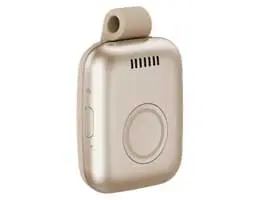
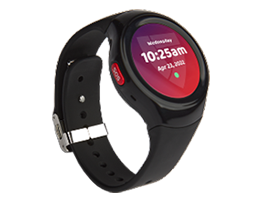
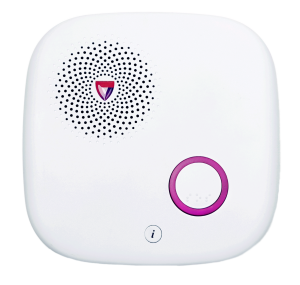
Available fall detection technology across Medical Guardian device types – pendant, clip-on, wristband, and smartwatch – ensures Medical Guardian meets the needs of seniors with different lifestyles and mobility levels.
Why Are Falls A Risk?
The facts around falls and older adults are sobering. According to the CDC, falls are the leading cause of injury-related death for those 65 and older. In 2021, over 38,000 deaths were attributed to these incidents. Each year, falls result in three million emergency room visits and about one million hospitalizations.
Falls also have a cascading effect on seniors. Mobility can be significantly reduced due to hip fractures, head injuries, and spinal damage.
Then, there’s the less visible impact. A fall can lead to fear of walking or climbing stairs, resulting in reluctance to leave home or participate in activities. Over time, reduced movement leads to weakened muscles and imbalance, increasing the risk of another fall.
The National Council on Aging (NCOA) notes that falls usually result from a combination of factors that develop gradually rather than a single cause. Reduced muscle strength and slower reflexes are just the starting points. Medication side effects, poor vision, and chronic illness also play a role. Uneven flooring, poor lighting, and the type of footwear can contribute to a fall risk.
An accompanying issue with these events is that a senior who has fallen may be unable to reach a phone or press an emergency button. They may lack the strength to stand or crawl to safety. Unconsciousness could make things worse.
In these crucial moments, the ability to automatically request help can reduce delays in getting assistance.
That’s why fall detection technology has become an increasingly important part of modern medical alert technology. An NCOA study revealed that fall detection is the most requested feature in these systems.
What Is Fall Detection & Who Needs It?
Fall detection is a function available in many wearable medical alert devices. When a movement pattern associated with a fall is detected, the system contacts a monitoring center for follow-up support.
Traditional emergency call button units require the user to press a button for help. However, as mentioned, this may not always be possible. Fall detection runs in the background without the wearer’s active involvement.
This technology can be especially useful for seniors who live independently or may be alone at different times of the day. Someone recovering from surgery or dealing with a neurological condition is just one example of how automatic fall detection can provide safety and peace of mind.
Importantly, fall detection is designed to supplement, not replace, the help button on a every medical alert system. Think of this feature as backup protection. If possible, pressing the button is the best first step in an emergency. However, if the person is unconscious or immobilized, the device can still initiate contact with a monitoring center.
Fall detection also helps ease the worries of caregivers and family members about what might happen if something goes wrong when the senior is alone. Ultimately, it’s a balance of independence and security.
How Does Fall Detection Technology Work?
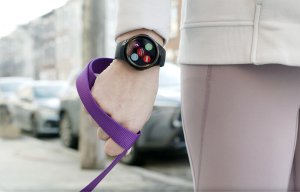
Fall detection works through a combination of hardware and software. Most devices have an accelerometer that measures changes in speed and a gyroscope that analyzes orientation and rotation. The same types of sensors are used in smartphones and fitness trackers to monitor steps, movement, and physical activity.
With a medical alert device, the system looks for a rapid downward motion followed by stillness, a pattern often associated with falls. Next, the event parameters are compared against stored algorithms to distinguish between normal movement and a potential emergency.
If a possible fall has been detected, the system usually begins a countdown. This gives the wearer time to cancel the alert by pressing the button or responding verbally (depending on the system). And, yes, a dropped device can occasionally trigger a fall alert.
If the alert isn’t canceled, contact with the monitoring center is initiated through cellular service or the base station. The operator will attempt to speak with the wearer through the device’s built-in speaker to assess the situation.
Emergency responders may be dispatched, especially if the wearer is unresponsive. While no fall detection system is perfect, this feature can go a long way in minimizing post-fall complications.
Types of Fall Detection Devices
Fall detection isn’t limited by the medical alert system’s form factor. There are several types of devices, each suited to different users and lifestyles. Remember that fall detection may be an option with some systems.
Most medical alert systems fall into two categories:
- At-Home: A base station is linked to a help button that is worn as a pendant or in a wristband holder. Connectivity to the monitoring center is maintained through cellular service or a landline. The range can vary by system and surroundings, but generally covers 1,000 feet from the base unit. Better units have a longer range. Some companies offer hybrid systems with cellular/GPS capabilities for use at home and away.
- On-the-Go: More independent seniors who travel outside the home can benefit from devices with a cellular connection and GPS tracking. The devices range from a small pendant or a pager-style clip-on device to a watch-style unit. Some companies offer smartwatches with smartphone linking, step tracking, reminders, and other features.
One style isn’t necessarily better than another when it comes to fall detection. Effectiveness is ultimately based on wearability and continuous use.
“A medical alert device only works if it is worn consistently. Comfort, fit, and how it integrates into daily routines play a major role in long-term safety,” reminds Matt Guerrieri, Medical Guardian’s Chief Marketing Officer.
The Best Fall Detection Devices in 2026
Evaluations from the National Council on Aging, TheSeniorList, and SeniorLiving.org consistently show that response speed, monitoring reliability, and device variety can vary significantly between providers. All the companies listed here offer fall detection as an available option on most devices.
At-A-Glance: Best Fall Detection Devices in 2026
| Company | Device Types Available | Average Response Time* | In-Home Device Range* | In-Home Device Max. Battery Life* |
| Medical Guardian |
Pendant, wearable, smartwatch, home systems | 51 seconds | 1,000 feet | 3 days |
| Bay Alarm Medical | Home base units, mobile devices, smartwatch | 51 seconds | 1,000 feet | 3 days |
| MobileHelp | Hybrid home/mobile systems, GPS wearables | 49 seconds | 1,400 feet | 4 days |
| Medical Alert | Landline, cellular, and mobile systems | 42 seconds | 800 feet | 2 days |
| LifeStation | Home and mobile pendants, smartwatch | 27 seconds | 1,300 feet | 5 days |
* Response time, range, and battery figures based on NCOA data, February 2026. Table reflects a selection of leading providers.
Medical Guardian
Medical Guardian frequently ranks near the top of independent evaluations. The National Council on Aging named it the best overall medical alert system in its testing, citing its broad device lineup and fast response performance. Hands-on trials from TheSeniorList also recorded extremely fast operator connection times in some tests. Everyday Health ranked Medical Guardian as the best overall medical alert system.
The company’s offerings include pendant and clip-on devices, mobile wearables, and a smartwatch, along with caregiver apps. Medical Guardian takes an à la carte approach to equipment and service pricing versus all-in-one bundling.
Pros
- Consistently high rankings in independent testing
- Wide device range, including smartwatch options
- Strong response-time performance in third-party evaluations
Cons
- Equipment fees and add-ons can increase the total cost
Bay Alarm Medical
Bay Alarm Medical earns its stripes as a mid-range provider with a strong reputation for customer service. Independent reviews give the company good marks for monitoring performance and an uncomplicated activation process.
However, reviews note that the firm has fewer device and mobile tool options than competitors. While response times typically fall within acceptable industry ranges, they are not consistently among the fastest measured.
Pros
- Solid monitoring reputation and customer service feedback
- Simple activation and reliable performance
Cons
- Fewer advanced wearable and app features than some competitors
- Response speeds generally average rather than top-tier
- Smartwatch options lack some features found in newer devices
MobileHelp
MobileHelp features a hybrid device that combines a home base station with a mobile GPS wearable, allowing users to move between indoor and outdoor environments while staying connected.
As a result, its product lineup is more limited than rivals. MobileHelp doesn’t currently offer a smartwatch, but it does have traditional at-home base units with landline or cellular connections. Third-party reviews are generally strong, highlighting reliability and straightforward setup.
Pros
- Hybrid home/mobile design supports varied routines
- Consistent monitoring performance in reviews
Cons
- Limited device variety and fewer wearable options
- No smartwatch-style device available
Medical Alert
The company offers traditional at-home systems using landline or cellular connections, as well as GPS-enabled mobile devices. Independent reviews give Medical Alert good ratings for dependable monitoring performance that falls within industry averages. Equipment setup is generally uncomplicated.
However, the selection of wearable options and digital tools is more limited than that of competitors that focus on mobile connectivity and caregiver resources.
Pros
- Flexible connectivity options including landline support
- Reliable monitoring performance
Cons
- Limited wearable variety and fewer digital caregiver tools
- Shorter in-home range and battery life
- Mobile features are less robust than newer systems
LifeStation
LifeStation offers a more limited lineup of devices and tools, emphasizing clear audio communication and dependable monitoring. Reviews highlight positive operator interactions and straightforward system activation.
Fewer advanced system options and caregiver features put LifeStation behind some rivals, limiting lifestyle flexibility. Its digital tools are also more limited than those of some competitors, which can be a drawback for users and caregivers.
Pros
- Reliable monitoring and clear communication quality
- Simple setup and activation
Cons
- Narrow device range and limited modern features
- Fewer wearable styles than many competitors
- Limited caregiver-facing digital tools
Choosing the Right Fall Detection Device
The ideal fall detection system is built not only around technology but also the user’s lifestyle. Whatever device you select needs to fit into everyday life while addressing comfort and mobility needs. Don’t just focus on specifications; look at the bigger picture for protection and peace of mind.
- For mostly in-home/in-yard use, select an in-home system with a strong signal range.
- Look for a GPS-enabled device for seniors who regularly leave the house.
- Consider comfort and functionality to ensure the device is worn consistently.
- Examine caregiver tools that enable family members to stay informed.
- Evaluate subscription flexibility rather than focusing on price alone.
- Remember that monitoring reliability and response quality are critical.
Fall Detection Device Key Takeaways
- Falls are a leading cause of injury among older adults. A medical alert system with fall detection provides a vital safety layer for seniors who live independently.
- Fall detection technology uses sensors and algorithms to detect sudden impacts and request assistance if the wearer is unconscious or unable to press the help button.
- A medical alert device must be worn consistently to provide maximum protection against falls and other emergencies.
- Not all medical alert systems are created alike. Independent reviews show differences in response times, range, and battery life.
- Medical Guardian consistently ranks high in third-party evaluations of its response times, device lineup, signal range, and other key factors.
FAQs
Will Medicare pay for a fall alert device?
No. Original Medicare (Part A and Part B) doesn’t cover medical alert systems. These devices are considered personal safety devices rather than durable medical equipment. Some Medicare Advantage plans (Part C) may offer limited benefits, but coverage varies by provider.
Is there a wearable fall detection device without a monthly fee?
Some standalone wearable devices have basic fall detection without a subscription, but 24/7 monitoring isn’t usually included. Without around-the-clock support, alerts may only be sent through an app or phone, potentially limiting access to crucial help in an emergency.
What is the most reliable fall detection device?
A device that’s worn consistently, backed by fast response times and high-quality monitoring, is the best protection in the event of a fall. Look for companies, like Medical Guardian, that earn top ratings from independent tests to help you select the best medical alert device with fall detection.
What are the downsides of no-subscription trackers?
Devices without monitoring plans may detect a fall and can place an emergency call on some platforms, but they don’t provide a staffed monitoring center to verify events, share health information, or coordinate caregiver follow-up.
What is the best fall alarm for the elderly?
The best fall detection system balances comfort, reliability, and monitoring support. Top systems feature fast response times, comprehensive signal coverage, and caregiver connectivity tools to support independent living for seniors.

David Goldberg
David Goldberg brings a long career in senior living to his writing. His background includes communications and education roles with Sunrise Senior Living. He was also the co-founder of Senior Living University, a training company serving professional caregivers and industry executives. David holds a Bachelor of Arts in Journalism and a Master of Public Administration from The George Washington University.