Quick Answer: What is the best senior monitoring system in 2026?
After comparing leading elderly monitoring systems (sometimes medical alert systems) across independent testing and user reviews, Medical Guardian ranks as the strongest overall choice for 2026. The company earns a 9.9 out of 10 rating from the National Council on Aging (NCOA) and maintains consistently high scores across consumer review platforms, including 4.9 out of 5 from ConsumerAdvocate.
What separates Medical Guardian is how its system performs in everyday use. Fast connection times, a broad range of device options, and features designed for both users and caregivers give it an edge in situations where reliability matters most. Other providers offer similar core functions, but differences in monitoring performance and device flexibility become more obvious over time.
Why Choose a Home Monitoring System for Elderly Parents?
Here’s an eye-opening statistic from AARP: 75% of adults 50 and older want to remain in their homes as they age. Yet that preference comes with risks, especially if a fall occurs or a sudden medical issue arises. At home, immediate help may not always be available, or calling 911 could be challenging.
An emergency monitoring system can address these gaps by providing direct access to a 24/7 monitoring center. Users are seconds away from reaching a trained operator at any time. Equally important, mobile medical alert devices can support the active and independent lifestyle that so many seniors demand today. Protection isn’t limited to the home.
A monitoring system can also help delay or avoid more expensive care if a senior does not need help with bathing, dressing, or other activities of daily living. With assisted living averaging about $6,200 per month, a premium emergency alert system typically costs less than 1% of that amount.
Family members and caregivers also benefit. Many systems offer GPS tracking, notifications, and mobile apps that let loved ones stay informed without being on-site.
What To Look For In An Elderly Monitoring System
Not all monitoring systems perform the same in real-world situations. Several factors determine device effectiveness in an emergency.
Monitoring Quality and Response Time
At the heart of every system is the monitoring center. This critical link is activated when the user presses the help button or when a fall is detected by an appropriately equipped device. At that point, a connection is established with a live operator, who evaluates the situation and contacts emergency services if needed. Better providers have U.S.-based monitoring centers staffed by operators with Five Diamond certification from TMA (The Monitoring Association).
Response time plays a critical role here. In testing of medical alert smartwatches (covered below), TheSeniorList found the fastest connection was from Medical Guardian, averaging about 10 seconds. While response time can vary depending on network conditions and call volume, faster connections generally lead to quicker assistance, which can be critical in emergencies.
Device Options and Flexibility
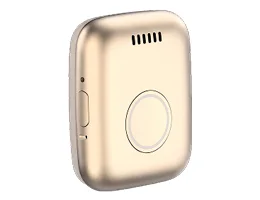
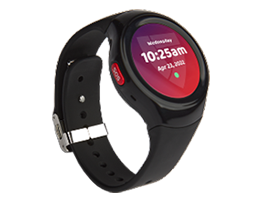
While basic in-home units are often the core of an elderly monitoring system, they are not the only option. Mobile devices that feature GPS tracking and cellular connectivity come in many forms, including pendants, clip-on units, watch-style wearables, and smartwatches.
The best device is the one that matches the user’s daily routine and lifestyle. It’s not unusual for some seniors to have both in-home and mobile devices for maximum coverage. Before signing up with any provider, consider the company’s device lineup to ensure future flexibility.
Fall Detection
NCOA reports that fall detection is the most requested feature in an elderly monitoring system. That’s hardly surprising when 28% of adults age 65 and above have fallen one or more times in the past year, according to the CDC.
Fall detection is typically available as an option (usually about $10 per month) to many systems. Using sophisticated hardware (accelerometers and gyroscopes) and advanced algorithms, the feature can detect most sudden falls. Upon activation, the system will give the wearer time to cancel the alert. Otherwise, the monitoring center operator connects to assess the situation. This automated approach is ideal if the wearer is unconscious or can’t reach the device.
Cost and Pricing Structure
There are two main costs associated with an elderly monitoring system:
- Monthly Monitoring Fee: Most companies require a subscription to a monitoring service, which generally ranges from $20 to $50 per month. Some providers offer reduced rates for quarterly or annual plans.
- Equipment: Prices can vary significantly by device and company, but hardware usually costs $100 to $200. This is a one-time cost. Be alert to companies that charge activation fees, which can make equipment more expensive.
Types Of Elderly Monitoring Systems
Elderly monitoring systems typically fall into two main categories, each designed for different use cases.
At-Home Systems
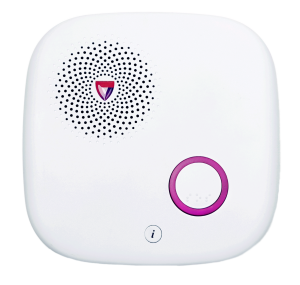
At-home systems use a base station connected via landline or cellular service. A wearable help button (worn as a pendant or on a wristband) allows the user to contact the monitoring center from anywhere within range of the base unit. These systems are well-suited for seniors who spend most of their time at home. Coverage typically extends several hundred feet from the base station, with better units reaching up to 1,400 feet.
Mobile Systems
Mobile systems aren’t tied to the house. They use a built-in cellular connection, so help is still a button press away, whether someone is out for a walk or running errands. Most are worn as pendants or watches, though some models can be clipped to clothing. Like their at-home counterparts, these units feature a help button and two-way voice communication with the monitoring center.
Hybrid Systems
Some providers offer hybrid systems that combine at-home and mobile functionality. These systems can operate within the home while also providing on-the-go coverage, though they may be bulkier than standalone mobile devices.
Best Senior Monitoring Systems: Side-By-Side
A side-by-side comparison helps put the differences into context. Most systems offer the same basic functions—24/7 monitoring, a wearable help button, and optional fall detection, but how they perform in everyday use can vary.
The options below highlight some of the most widely reviewed providers, with Medical Guardian serving as a benchmark, given its #1 ranking across 15 review sites.
At-A-Glance: Best Senior Monitoring Systems
|
Provider |
NCOA Rating |
Device Types |
In-Home Range* |
Starting Monthly Cost |
|
Medical Guardian |
9.9/10 |
Home, mobile, smartwatch |
1300 feet |
$27.95 |
|
Bay Alarm Medical |
9.8/10 |
Home, mobile, smartwatch |
1000 feet |
$27.95 |
|
LifeStation |
8.9/10 |
Home, mobile, smartwatch |
500 feet |
$38.95 |
* Data from TheSeniorList.
Medical Guardian
Medical Guardian ranks as the top overall system in independent testing, supported by strong performance across multiple evaluation categories. The company offers a wide range of devices designed for both in-home and mobile use.
Average Response Time (NCOA): 29 seconds
Equipment Options, Features, & Technology
Device Types: At-home units, on-the-go options (pendant/clip, watch-style wearable, and smartwatch)
Medical Guardian’s at-home units use either a landline or cellular connection. Mobile devices use cellular signals and GPS tracking. All devices have two-way voice communication and optional fall detection.
Installation/Setup
NCOA gave Medical Guardian a thumbs up for “Beginner-friendly setup with clear manuals and simple unboxing.”
Customer Service Reviews
“I was looking for a medical alert pendant for my mom. Called several companies. Medical Guardian offered the best customer service from the very beginning,” said a reviewer on ConsumerAffairs.
Service Cost
- At-home landline: $27.95–$31.95/month
- At-home cellular: $34.95–$38.95/month
- Mobile (pendant/clip): $39.95–$43.95/month
- Mobile (watch-style wearable): $42.95–$46.95/month
- Mobile (smartwatch): $38.95–$42.95/month
- Add-on/fall detection: $10.00/month
Pros
- Highest overall rating in independent testing
- Wide selection of device types
- Fast monitoring response times
- Strong customer satisfaction
Cons
- Equipment cost required for some devices
Bay Alarm Medical
Bay Alarm Medical has a range of monitoring devices and is among the better-reviewed companies. However, the SOS Home (an in-home unit) doesn’t have the longest range, and NCOA notes below-average battery life for some mobile devices. Response time is also longer than that of some competitors.
Average Response Time (NCOA): 51 seconds
Equipment Options, Features, & Technology
-
Device Types: At-home units, on-the-go options (pendant/clip, watch-style wearable, and smartwatch)
Bay Alarm Medical relies on landline or cellular connectivity for at-home devices. Mobile units incorporate cellular and GPS technologies. Two-way voice communication is standard, while fall detection is optional.
Installation/Setup
An NCOA review included positive impressions of the support materials and setup process, but the user manual lacked basic information about charging times.
Customer Service Reviews
Google Reviews for Bay Alarm Medical’s customer service are generally good. However, some individual comments suggest that some company representatives were unable to fully address certain issues.
Service Cost
- At-home landline: $27.95/month
- At-home cellular: $34.95/month
- Hybrid (home/mobile): $34.95/month
- Mobile (pendant/clip, watch-style wearable): $34.95/month
- Mobile (smartwatch): $39.95/month
- Add-on/fall detection: $10.00/month
Pros
- Competitive pricing
- Easy setup process
- Reliable core features
Cons
- Below-average response time
- Incomplete user manual
LifeStation
LifeStation is another well-known medical alert provider, yet it doesn’t offer a watch-style wearable, only a smartwatch, leaving the company behind some competitors, including Medical Guardian. LifeStation’s monthly fees tend to be higher than those of some rivals.
Average Response Time (NCOA): 27 seconds
Equipment Options, Features, & Technology
-
Device Types: At-home units, on-the-go options (pendant/clip and smartwatch)
LifeStation offers in-home devices with either a landline or cellular connection. Cellular- and GPS-based mobile devices are available in pendant/clip and smartwatch formats. Two-way voice communication is standard, while fall detection is optional.
Installation/Setup
According to NCOA, setting up LifeStation devices is uncomplicated.
Customer Service Reviews
Google Reviews for LifeStation show a lower overall rating than competitors, including Medical Guardian. Some feedback reflects difficulties with customer service, technical support, and refunds.
Service Cost
- At-home cellular: $38.95/month
- Mobile (pendant): $40.95/month
- Mobile (smartwatch): $48.95/month
- Add-on/fall detection: $16.00/month (includes device protection), $8.00/month (with smartwatch)
Pros
- Simple, easy-to-use systems
- Reliable core monitoring features
- Straightforward setup
Cons
- Fewer device options than some competitors
- Higher monthly service fees
Key Takeaways
A few things become clear once you look past the specs:
- Medical Guardian ranks first across different reviews, not just one source.
- Response time isn’t identical across providers; some connect noticeably quicker than others.
- The best device type depends on the person using it, especially how often they leave the house.
- Monthly pricing varies by provider; check service costs before signing up.
FAQs
What’s the best tech to monitor elderly parents?What’s the best tech to monitor elderly parents?
Many families use a medical alert system with 24/7 monitoring and access to emergency support. Depending on the device, service is available at home or on the go.
How do I monitor my elderly parent living alone?parent living alone?
Start with a medical alert device, then add tools like caregiver apps or check-in routines. Some systems also include location updates and alerts.
What is the best-rated medical alert system for seniors?
Independent testing places Medical Guardian at the top, including a 9.9/10 rating from the National Council on Aging and a 4.9/5 rating from ConsumerAdvocate.
What is the 40–70 rule for aging parents?
It’s a guideline: if you’re around 40 and your parents are near 70, it’s time to start planning for future care needs before issues come up.
Is there a camera for monitoring elderly parents?
Yes, but they’re usually used alongside other tools. Cameras can help with remote visibility, while alert systems handle emergencies and direct response.

David Goldberg
David Goldberg brings a long career in senior living to his writing. His background includes communications and education roles with Sunrise Senior Living. He was also the co-founder of Senior Living University, a training company serving professional caregivers and industry executives. David holds a Bachelor of Arts in Journalism and a Master of Public Administration from The George Washington University.