

MGHome Landine
Find Solutions
Getting Started
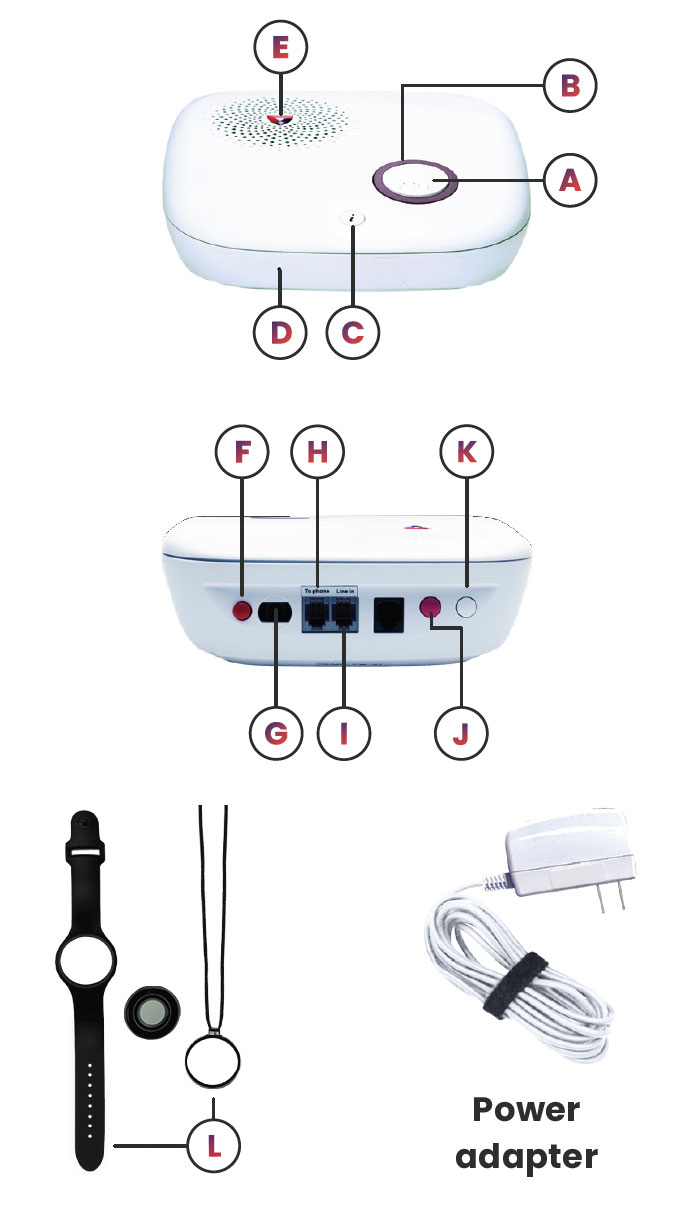
Parts Identification
Set Up & Installation
Where to place your base unit
The base unit requires main power and a constant telephone connection and should be easily accessible. Please avoid the following — the base unit should not be placed:
- In a damp location, such as a bathroom.
- Close to any heat source, such as microwave ovens, which can reduce call quality.
Please follow these steps to install your landline device to a WALL JACK:
- Find the main home phone wall jack. We recommend placing the base station close to the main landline telephone wall jack in your home using the provided six (6) foot phone cord.
- Look at the back of your base station. You will see two ports. One that says “LINE IN” and one that says “TO PHONE.”
- Look at the back of your home phone. You will remove the phone line from the back of your home phone. Place that cord into the “LINE IN” port on the back of your base station.
- The phone cord we provided will plug into the back of your phone and then into the “TO PHONE” port on the back of your base unit.
- Power on the base unit. Please allow for your device to display a steady green light (this may take a few seconds).
- Pick up the home phone to check for a dial tone.
Please follow these steps to install your land line device to a MODEM:
- Find the modem the home phone is connected to. We recommend placing the base station close to the main landline telephone wall jack in your home using the provided six (6) foot phone cord.
- Look at the back of your base station. You will see two ports. One that says “LINE IN” and one that says “TO PHONE.”
- Look at the back of your home phone. You will remove the phone line from the back of your home phone. Place that cord into the “LINE IN” port on the back of your base station.
- The phone cord we provided will plug into the back of your phone and then into the “TO PHONE” port on the back of your base unit.
- Power on the base unit. Please allow your device to display a steady green light (this may take a few seconds).
- Pick up the home phone to check for a dial tone.
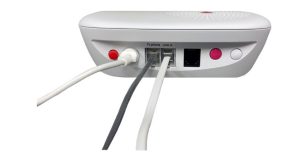
- For wall jack installation, there should be one cord from the wall jack to “line in” on the base unit, and one cord from the home phone to “to phone” port on the base unit.
- For modem installation, there should be one cord from modem “line/tel” to “line in” on the base unit, and one cord from the home phone, to “to phone” port on the base unit.
How to Call for Help
An alarm is activated by pressing the help button, which is the white button within the purple circle or a peripheral button.
Button Pairing
- Press and hold the white pairing button on the back of the base unit for 3 seconds. The info button will flash blue while the base unit is in pairing mode.
- The base unit will beep and state “Entering pairing mode, press the button on the peripheral to connect to the device.”
- Press and hold the peripheral button for three seconds. The base unit will state “Pairing completed, exiting learning mode.”
Voice Prompts
Power On or Off
Turn on your base unit
- Plug the power adapter into a direct wall socket that is not connected to a light switch.
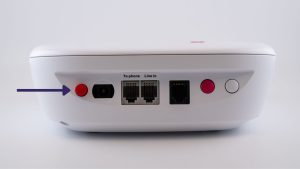
- Press the red power button on the back of the base unit.
To power off your device, follow the steps below:
- Go to your base unit.
- Look at the back side of the unit (where the cords are).
- Press the RED button near the white power cord.
- The berry LED will go out and means the device is powered down.
- If necessary, you can now safely unplug your device.
Light Indicators
| What it means | What it does |
| Normal |
|
| Running on the back-up battery |
|
| Alarm activation |
|
| Pairing mode |
|
| Telephone line problem |
|
| Base unit low-battery alert (This is the backup battery) |
|
| Device (peripheral) Peripheral button low battery/device tamper (wall buttons) /device (peripheral) Peripheral button out of range |
|
| Firmware update |
|