MG support
Home 5 MGHome LT

Find Solutions

Set Up & Installation
  1. Plug the device into a power outlet not controlled by a light switch.
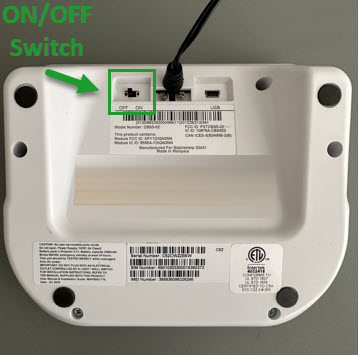
  2. Turn the device on using the on/off switch on the back of the device.
  3. Once you hear “System ready”, the device is connected to the network.
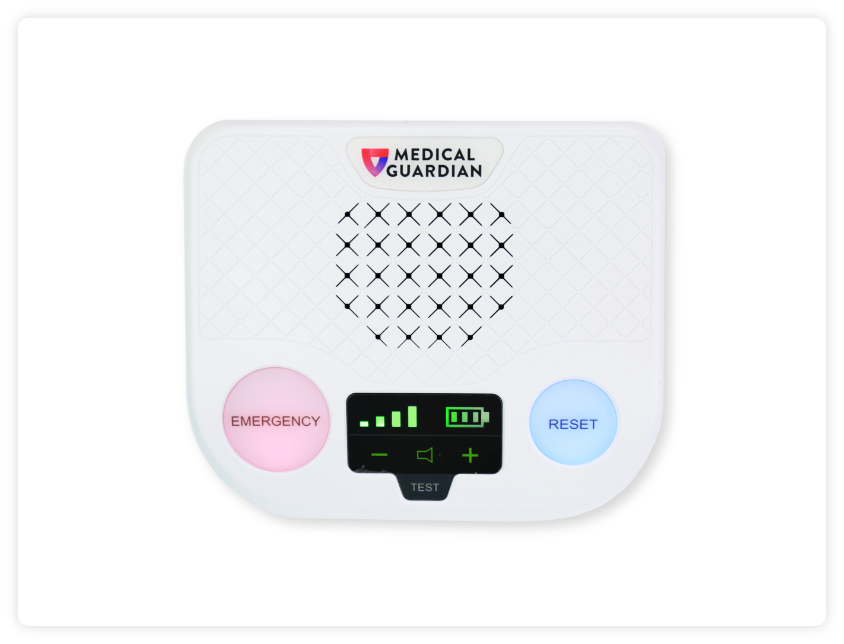
Parts Identification & Light Indicators

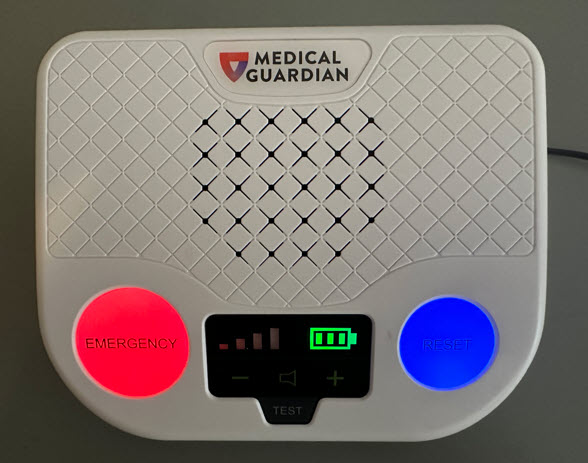
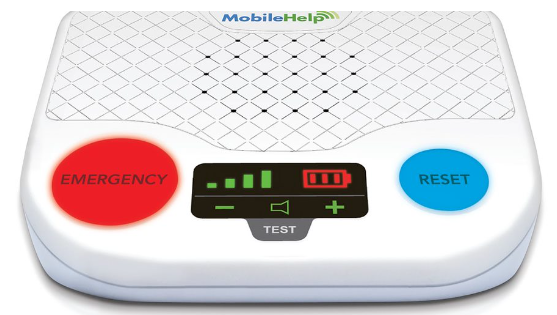
Emergency Button – Red

  • Press and release to activate the alarm.
  • Light will always be illuminated red.

Reset Button – Blue

  • Will always be illuminated blue.
  • Not in use.

Test

  • Not in use.

Display Screen

  • Should display cellular strength (indicated by bars) and backup battery level.
  • Use the + and – to increase/decrease volume.
Pairing Buttons

Gather any/all buttons:

  1. Take the buttons over to the base station. The base station needs to be plugged in and powered on.
  2. Press and HOLD the red emergency button until you hear the device say “training initiated” and then let go. Important! If the red emergency button is not held down until “training initiated” is heard, it will call the monitoring center.
  3. Press the new button (just once) and release.
  4. You will hear “device training success”.
  5. Wait until you hear “device training completed” to conclude the training process.
  6. Test the button to confirm it is properly paired.
Fall Detection

    Fall Detection can provide peace of mind knowing that our monitoring center will receive a signal to send help without the push of a button for additional $10.00 monthly.

    • Fall Detection pendants contain tiny sensors that can detect changes in motion, as well as changes in the height of the pendant.  If a fall is detected, the device will send an alarm to the monitoring center to begin the normal call process.
    • Fall Detection works best when worn around the neck and outside of clothing.
    • Fall Detection does not detect 100% of falls. If you are able, press your fall detection button in the event of an emergency. You may experience false alarms from time to time. Please advise the operator it was a false alarm.
    • This is a physical button.
    • The fall detection pendant should be worn around the neck and on the outside of the clothes.
    • Has a range of 1,400 ft from the base station.
    • Battery life up to three years.
    Testing Your Device

    It is recommended to test your device and pendants monthly to ensure they are working properly.

    Follow the steps below to test your device and pendants:

    1. Press the transmitter button firmly and release. The device will announce, “Call in progress.”
    2. To test the base device, press the red emergency call button.
    3. The device will state “Call in Progress” and then “Call Connected”.
    4. The device will connect to Stella, the automated voice assistant.
    5. If a live operator responds through the device, inform the operator that “this is just a test.”
    6. Important! Be sure to wait at least 60 seconds between tests.
    Best Practices

    Button to Base Range
    The base unit can detect a button press within a 1,400 ft range from the base device. Help can still be sent if you aren’t able to communicate with the monitoring center and you are within 1,400 ft of the base device.

    Backup Battery
    In the event of a power outage, the backup battery will run for 24 hours. Once power is restored, the backup battery will recharge on its own.

    Monthly Testing
    It is recommended to test your base device, as well as any/all buttons, monthly to ensure they are working properly. Simply press the button and when you’re connected to the monitoring center, state that you are testing your device/button and no help is needed.

    FAQs

    How do I power on and power off my device?

    To power on the MGHome LT:

    1. Simply place the power adaptor into a wall outlet not controlled by a light switch.
    2. Turn the device on using the on/off switch on the back of the device.
    3. After a few seconds, the device will light up and the backup battery and signal strength will be displayed.
    4. Once you hear “system ready”, the device is connected to the network and ready to test.

    To power off the MGHome LT:

    1. Use the switch on the bottom of the device. Turn the switch to the “off” located on the back of the device. After a few seconds, all the lights will go out and the device will power down.

    Can I move this device to a new location?
    Yes, this device can be moved to a new location anywhere in the United States where there is a 4G cell network available. The new address will need to be provided (temporary or permanent) by calling the Customer Care department or by logging into the MyGuardian Customer Portal. The device should be tested at the new address to ensure it is working properly.

    Should extension cords and surge protectors be avoided?
    Yes, extension cords and surge protectors can limit the amount of power the device receives resulting in the device not working properly.  The device’s power cord needs to be plugged directly into a wall outlet that does not operate on a light switch.

    What material is used to make the neck button?
    The neck button is made of TPU (Thermoplastic polyurethane plastic) and has a nylon cord/lanyard attached.

    What material is used to make the wrist button?
    The wrist button is made of TPU (Thermoplastic polyurethane plastic) and has a silicone, latex free band.

    Are the buttons water-resistant?
    The wearable neck and wrist buttons are waterproof and can be worn in the shower and submerged underwater. The buttons should be towel dried after contact with water. All of our devices are IP67 Certified.

    How long does the battery in the button (neck and wrist) last?
    The buttons have a battery life of up to 5 years. An amber light will flash every 2 minutes to indicate a low battery. If you experience a low battery light indicator, please call our Customer Care department. We will be glad to replace it for you at no cost.

    How long does the battery in the Fall Detection button last?
    The Fall Detection button has a battery life of up to 3 years.  

    Can metal roofing/siding, trees, airports and other environmental factors have any effect on the device being able to connect?
    Yes, metal roofs/siding, concrete buildings (such as a basement), and environmental factors like wooded areas can have an impact on signal strength for a device which affects the device’s ability to connect.