

Mini Guardian
Find Solutions
Getting Started
Set Up & Installation
Follow these steps to install the Mini Guardian:
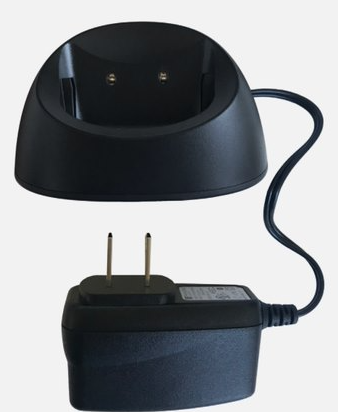
- Plug the charging cradle into a power outlet (a red light will illuminate on the cradle). Make sure the charging cradle is plugged straight into the wall outlet and not a power strip or extension cord.
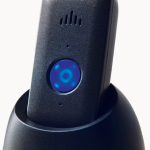
- Place the device into the charging cradle. The light on the device will illuminate. The device will vibrate and announce “Charging” when placed in the cradle.
- A blinking blue light means the device is connected to the network.

Light Indicators
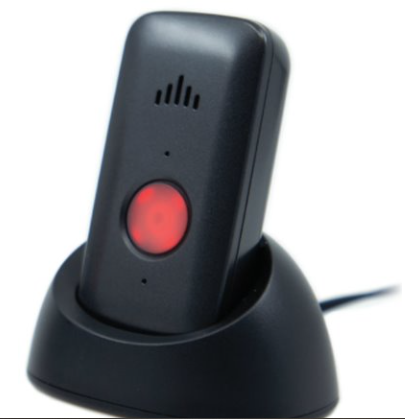
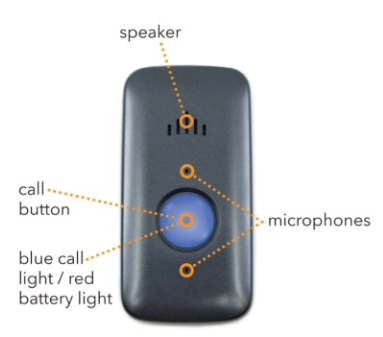
Blue Connection Light – off the charging cradle
- Light will flash every 26 seconds – connected to the network.
Blue Connection Light – in the charging cradle
- Light will flash every 5 seconds – connected to the network.
Blue Connection Light – during a call
- Solid light – normal.
Cradle
Best Practices
Lanyard & Belt Clip
Watch this video to attach & remove your belt clip.
Watch this video to attach & remove your lanyard.
To replace the lanyard with the belt clip:
- Remove the lanyard by twisting and pulling the belt clip.
- Pull the lanyard and belt clip away from the device.
- Press the belt clip onto the back of the device until it clips.
Fall Detection
Watch this video to learn everything you need to know about Fall Detection with your Mini Guardian!
Fall Detection can provide peace of mind knowing that our monitoring center will receive a signal to send help without the push of a button for additional $10.00 monthly.
Testing
FAQs
How do I power on and power off my device?
To power on the Mini Guardian:
- Simply place the mobile device in the cradle. The mobile device will state, “Charging.”
- The red LED light will flash every 5 seconds while charging and will go solid when fully charged.
- The blue call light will flash every 5 seconds when connected to the network.
- Wait 2 minutes after powering on before pressing the call button.
To power off the Mini Guardian:
- Press and hold the Reset button on the left-hand side of the device until the red LED turns on and then let go.
- The device will power off.
Can The volume be raised or lowered?
No, the volume is preset by the manufacturer and cannot be adjusted.
Can I move this device to a new location?
Yes, this device can be moved to a new location anywhere in the United States where there is a 4G cell network available. The new address will need to be provided (temporary or permanent) by calling the Customer Care department or by logging into the MyGuardian Member Portal. The device should be tested at the new address to ensure it is working properly.
Should extension cords and surge protectors be avoided?
Yes, extension cords and surge protectors can limit the amount of power the device receives resulting in the device not working properly. The charging cradle needs to be plugged directly into a wall outlet that does not operate on a light switch.
Is the mobile device water-resistant?
The portable device is water-resistant and can be splashed with water but not submerged underwater. The mobile device needs to be towel dried after contact with water. The device is IP67 Certified.
Can metal roofing/siding, trees, airports, and other environmental factors have any effect on the device being able to connect?
Yes, metal roofs/siding, concrete buildings (such as a basement), and environmental factors like wooded areas can have an impact on signal strength for a device which affects the device’s ability to connect.
Does the device contain magnets?
The Mini Guardian device itself does not contain any magnets. The optional snap-on lanyard does contain a stainless-steel magnetic pull-apart clasp.
Is the device pacemaker safe?
If you have a pacemaker, it’s important to consult with your medical professional and review your pacemaker materials regarding interactions with cell phones. You should then follow the same precautions recommended in those materials for using this medical alert device.
What information can I see in the MyGuardian Member Portal?
The MyGuardian Member Portal provides real-time updates from your device, including:
- GPS Information: Available — reports only when the help button is pressed.
- Step Counter: Available — reports once per day.
- Battery Level: Available — reports four times per day.
- Signal Strength: Available — reports four times per day.
You can view all of this information as it’s reported directly in your Member Portal & App.