
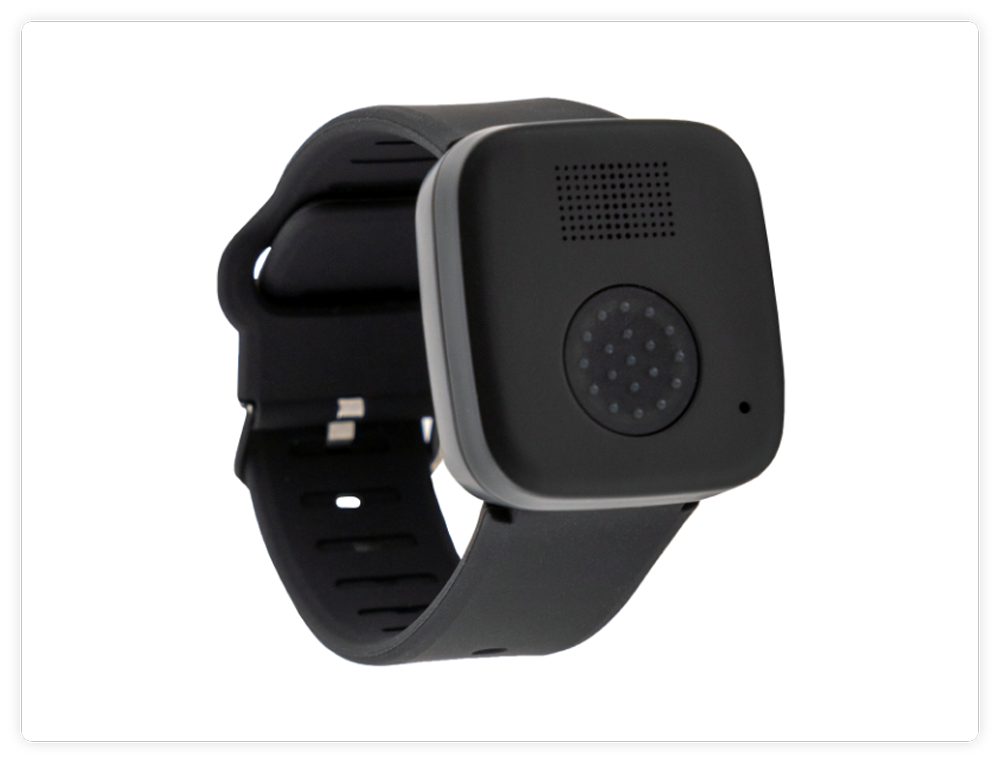
MGMini Lite
Find Solutions
Getting Started
Powering On & Off
- To power on the MGMini Lite while in the cradle, plug the charging cradle directly into a wall outlet.
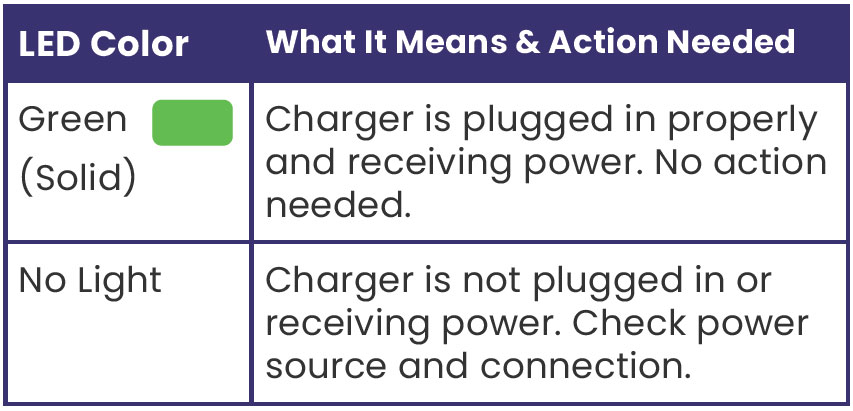
- When the charging cradle is plugged in and receiving power, a green LED light in the center of the front of the cradle will illuminate.
- Line up the device with the cradle and push down until the device magnetically pulls into place.
- If the device is cradled properly, you will hear an audible click, and the device will state “charging”.
The device will stay powered on at all times, but if you ever need to turn it off or back on, follow these steps:
Turning On Your Device
- To power on the MGMini Lite off the cradle, press and hold the help button for 2-3 seconds and then release.
- The device will start booting up, and once ready, you will hear a “Device Ready” message.
If your device does not turn on as expected, place it on the charger and check for a green light to confirm it is receiving power. If you need assistance, please contact Member Support.
Turning Off Your Device
-
To power off the MGMini Lite, quickly push the help button four times in a row (each press lasting less than 2 seconds).
-
You will hear an audio message confirming the device is “Powering Off.”
Parts Identification
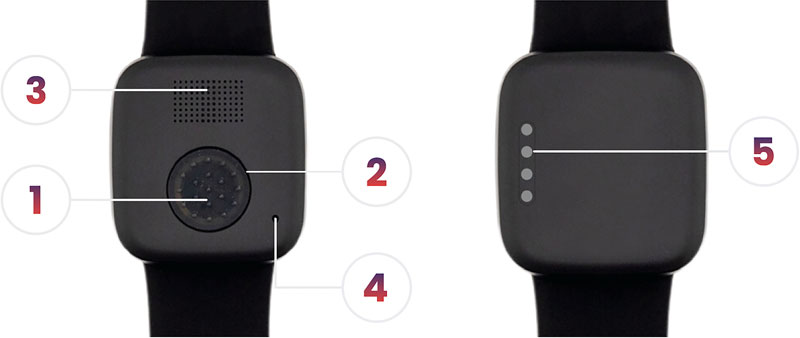
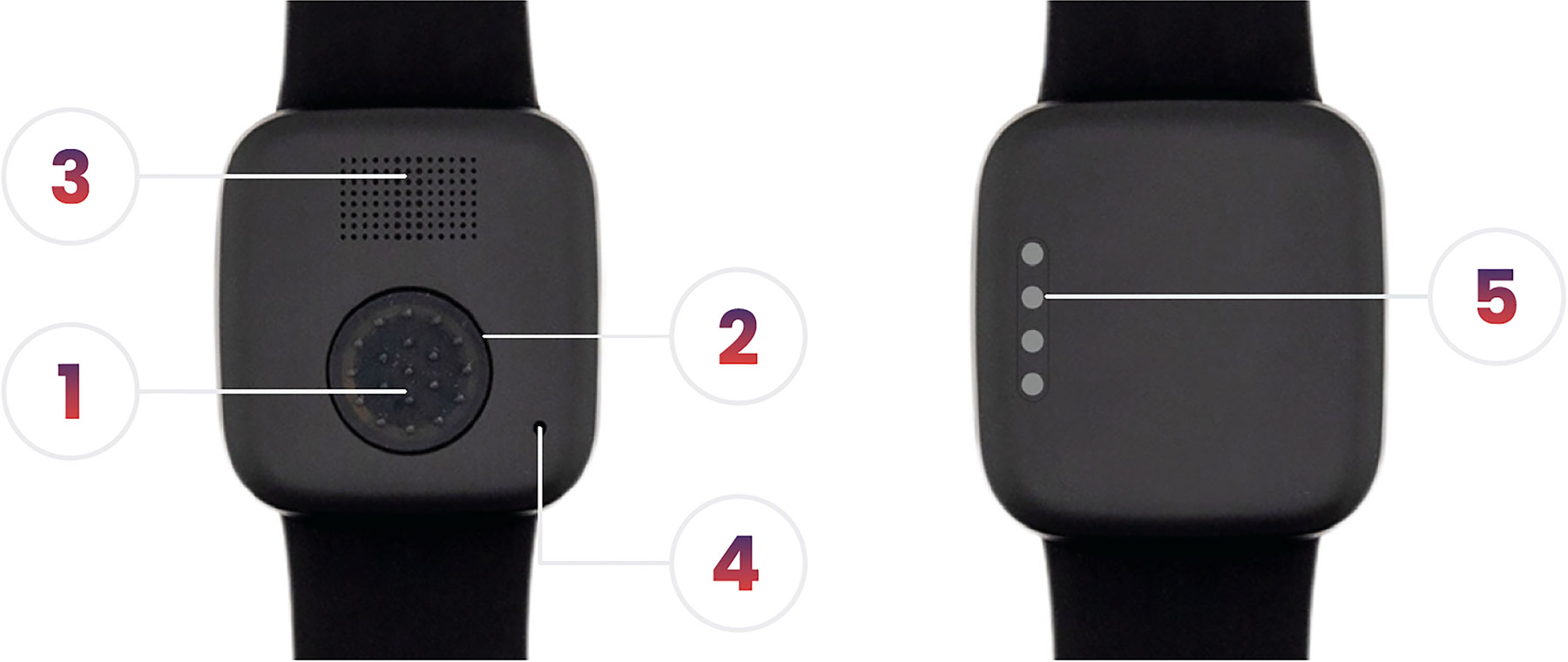
Wearable Wristband
The MGMini Lite will come with the wristband already attached.
Putting On The Watch:
- Examine the band to find the hole that corresponds to the desired fit. There are multiple holes to accommodate different wrist sizes.
- Put on the watch and fasten the buckle. Make sure the fit is comfortable and secure and that the watch isn’t too tight or too loose.
- If the band feels slightly off in terms of comfort or fit, you can fine-tune the fit by choosing a different hole on the band.
XL Bands Are Available:
If the watch does not fit, call Medical Guardian to receive an XL wristband.
- Standard Wrist band size: 9” L X 1” W
- Wrist band XL size: 10.375” L x 1” W
Replacing The Wristband:
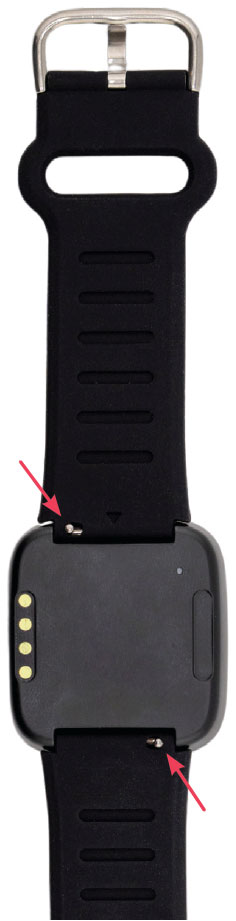
-
Turn the MGMini Lite over and locate the small silver quick-release pins on each wrist strap.
-
Remove the existing wristband by sliding the quick-release pin toward the center of the device and pivot the wristband away from the device.
-
Insert the side of the horizontal bar without the quick release into the hole on one side of the device.
-
Slide the quick-release pin toward the center of the device.
-
Pivot the wristband into the device by sliding the quick-release pin back into position once the wristband is firmly in the device.
Click here to watch how to replace the wristband of your device!
Set Up & Charging
IMPORTANT: Charge your device fully before your first test to ensure it is set up and connected.
Assemble the charger:
- Connect the USB-C cable from the charging cradle to the charging brick.
- Plug the charging brick into a wall outlet that is not controlled by a light switch to ensure continuous power.
Check for the green indicator light on the charging cradle:
- A solid green light on the cradle confirms the charger is connected properly and receiving power. If you do not see this light, please check the outlet and ensure all components are securely connected.
Place the device on the charging cradle:
- Align the metal charging pins on the back of your device with the metal charging pins on the charging cradle.
- You will hear a “Charging” message, confirming proper placement.
Battery Life & Charging Recommendations:
- We recommend charging your device every daily to ensure it is always ready to go. Typical charge time is 4 hours.
- We recommend placing the charger on a nightstand or other easily accessible spot where the device can stay nearby while charging.
Features & Add-Ons
Cleaning Your Device
We recommend that you clean your device weekly to ensure proper charging.
Take a soft cloth, such as an eyeglass cleaning cloth, and gently rub the metal charging pins on the device and charging cradle to remove dirt, oil, and debris.
You can also spray household cleaner onto the cleaning cloth to remove debris (Avoid use of any products containing bleach or ammonia, and do not spray directly onto the device or cradle).
Light Indicators
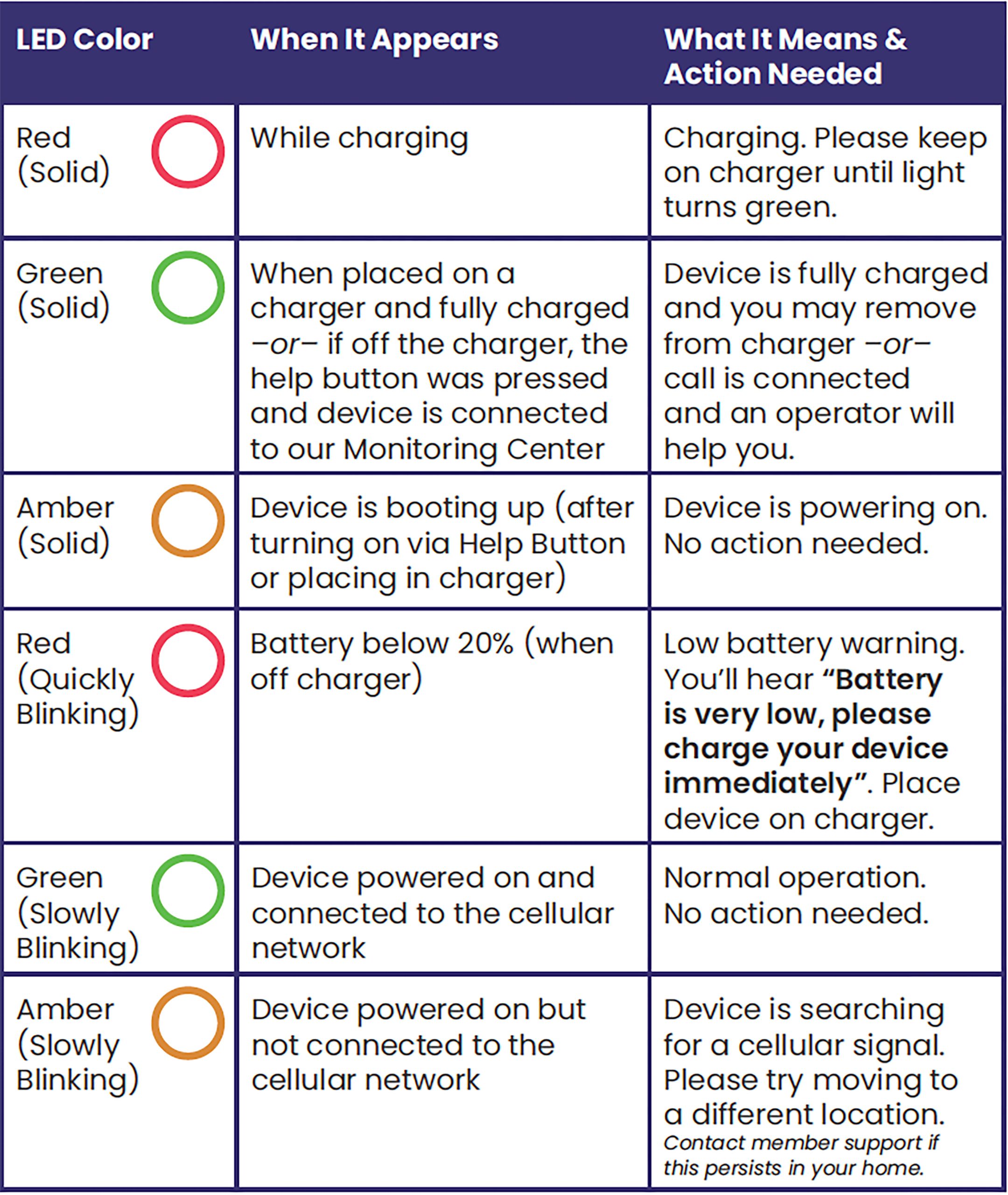

Testing Your Device
Regular testing helps ensure your device is always ready to use. It is recommended to test once a month so you feel confident using your device in any situation.
How to Perform a Test Call
- Press and hold the help button for three seconds, then release. The device will state, “Initiating help. Press and hold the help button to cancel”. Your device will flash green every few seconds while ringing and state “Call in progress” until the call is connected. Once connected, the light will turn solid green and state “Call connected”.
2. Once connected you will be asked if you need help or are just testing.
3. If testing, simply say “Just testing” and follow voice prompts. If you are unable to respond or state that you do need help, our 24/7 emergency operators will assist you and connect you with the right care for each situation, whether its dispatching emergency services or notifying an emergency contact. If help is needed, 24/7 trained emergency operators will connect you to the right care for each situation, whether it’s notifying an emergency contact or dispatching emergency services.
If the device does not connect properly during a test, please contact Member Support for assistance.
Fall Detection
Watch this video to learn everything you need to know about Fall Detection with your MGMini Lite!
If you’ve added fall detection to your device, it will connect you to our 24/7 monitoring team when a fall is detected. If you are unable to respond, our team will send help. To check if fall detection is enabled or to add it, log into your Web Portal or contact Member Support.
Canceling a False Alarm
- Press and hold the help button to cancel an alarm. You will hear “Call Cancelled.”
- If you do not hear this message, the call will continue to the monitoring team, where you can let them know it was a false alarm and that you do not need help.
FAQs
How do I know if the MGMini Lite is charging?
The device will state “charging” when it’s placed onto the charging cradle. You will also see the light around the call button flashing red.
How do I know when the MGMini Lite is fully charged?
Your device is fully charged when the light around the call button is solid red.
Is it possible that my location may not be found?
While it is very unlikely, it is possible that platform supporting the device may not receive a latitude or longitude or that an address cannot be found. In this case, all location technologies available will be used to locate the device. No technology works 100% of the time.
If I don’t need a cell phone, how does the device connect?
The MGMini Lite uses cellular coverage to work properly. It is important to test the device to ensure you have adequate cell coverage in your area. If you experience coverage issues, please contact Medical Guardian immediately.
Can I use this with my pacemakers?
If you have a pacemaker, it’s important to consult with your medical professional and review your pacemaker materials regarding interactions with cell phones. You should then follow the same precautions recommended in those materials for using this medical alert device.
Does the device contain magnets?
No, the MGMini Lite does not contain any magnets.
*No technology, including fall detection technology, works 100% of the time. If a fall occurs, you should always push your button.
*If your device does not connect properly, please contact Medical Guardian immediately.
Why is an AI Agent used when I press the button?
When you press your button, AI is used to assist with initial call routing to help determine the nature of the call—whether it’s a test or a true emergency—and ensure each situation is handled as quickly and appropriately as possible.
In the situation of testing, when the AI agent picks up, simply let them know, “This is a test.” The AI agent will walk you through the process and confirm that your microphone and speaker are working properly. We use AI in these situations to ensure testing / false alarms do not tie up emergency resources.
If you were to tell the AI agent you need help, or if there is any ambiguity in your response, your call will always immediately be escalated and prioritized for connection with a live emergency operator.
Additionally, if you do not respond at all, that also triggers an immediate connection with an operator to ensure your safety!
Overall, AI is just used in this case to streamline the process and keep the phone lines open for true emergencies. That way, you can be comfortable testing your device frequently!
Best Practices
Location Services:
The MGMini Lite uses Wi-Fi positioning to determine location. Wi-Fi positioning works by using signals from nearby Wi-Fi devices to determine the approximate location of the MGMini Lite.
Testing:
It is recommended to test the mobile device and any/all buttons once a month.
AI Agent Response
AI is used during device tests to quickly route your call and determine if it’s a test or an emergency.
When testing, simply say “This is a test” and the AI agent will guide you through confirming your microphone and speaker are working.
If you need help or if there’s any uncertainty, your call will immediately be escalated to a live operator.
AI ensures that false alarms don’t tie up emergency resources, allowing you to test your device without delay.